
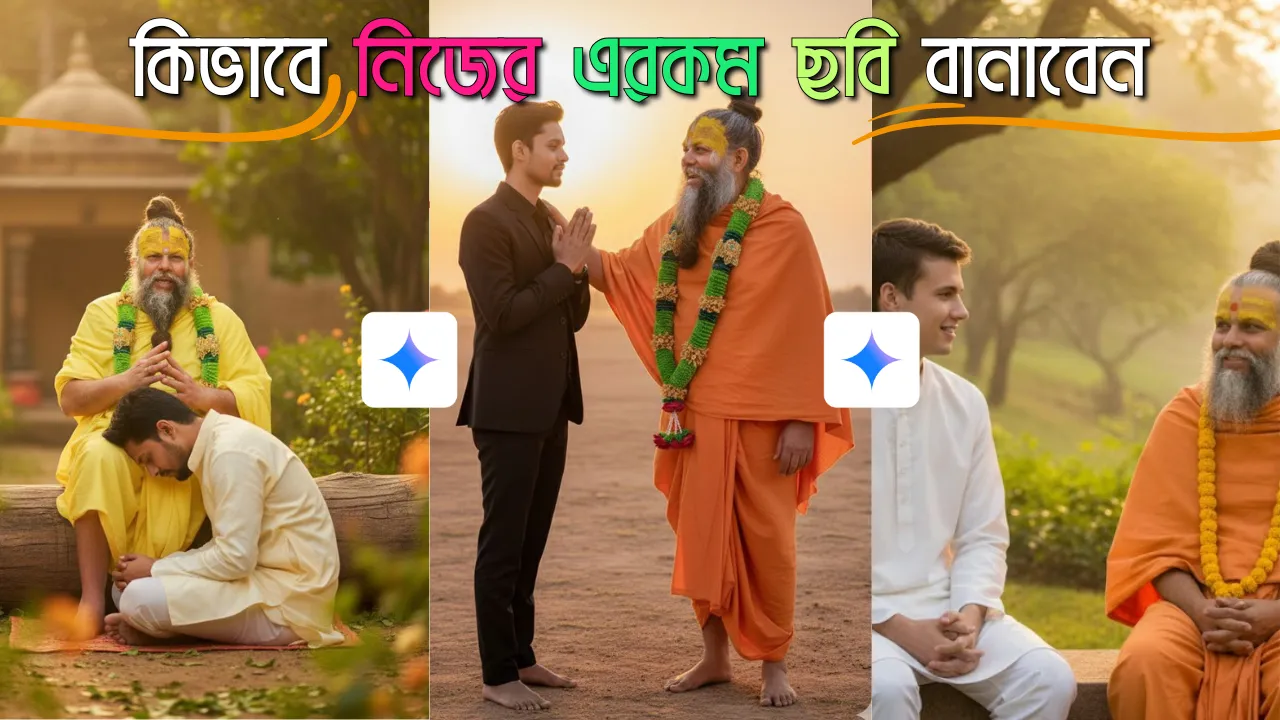
Premanand Maharaj Photo Prompt 2025: আধ্যাত্মিকতা এবং ভক্তি মানুষের জীবনে এক গভীর প্রভাব ফেলে। একজন ভক্তের কাছে তাঁর আধ্যাত্মিক গুরু বা ইষ্ট দেবের সান্নিধ্য লাভ করা এক পরম প্রাপ্তি। আধুনিক কৃত্রিম বুদ্ধিমত্তা (AI) প্রযুক্তি, বিশেষত Google Gemini-এর মতো শক্তিশালী প্ল্যাটফর্ম, এই আধ্যাত্মিক সংযোগকে এক নতুন মাত্রায় নিয়ে এসেছে। এখন আপনি আপনার নিজের ছবি এবং শ্রদ্ধেয় প্রেমানন্দ মহারাজ জির ছবি ব্যবহার করে এমন একটি ভক্তিমূলক মুহূর্ত তৈরি করতে পারবেন, যা আপনার হৃদয়ে চিরস্থায়ী হয়ে থাকবে।
এই নিবন্ধে, আমরা আপনাকে ধাপে ধাপে দেখাবো কিভাবে Gemini ব্যবহার করে প্রেমানন্দ মহারাজ জির সাথে আপনার একটি ব্যক্তিগত এবং আবেগপূর্ণ ছবি তৈরি করা যায়। আমরা একটি বিশেষ প্রম্পট নিয়ে আলোচনা করব এবং এর সাথে আরও ৫টি নতুন প্রম্পট দেব, যা আপনাকে আপনার পছন্দসই দৃশ্য তৈরি করতে সাহায্য করবে। মূল লক্ষ্য হলো, আপনার আপলোড করা ছবিগুলির মুখের অবিকল সাদৃশ্য বজায় রেখে একটি বাস্তবসম্মত ও ভক্তিমূলক চিত্র ফুটিয়ে তোলা।
কেন Gemini এবং দুটি ছবি আপলোড পদ্ধতি শ্রেষ্ঠ?
Google Gemini-এর মতো উন্নত AI মডেলগুলি এখন মাল্টিমোডাল ক্ষমতা সম্পন্ন। এর অর্থ হলো, এটি কেবল টেক্সট প্রম্পট নয়, একাধিক ছবিকেও ইনপুট হিসেবে গ্রহণ করতে পারে এবং সেই ছবিগুলির বিষয়বস্তু ও বৈশিষ্ট্যগুলিকে নতুন ছবিতে একত্রিত করতে পারে। দুটি ছবি আপলোড করার পদ্ধতির সুবিধাগুলি হলো:
- উচ্চ মুখের সাদৃশ্য (High Face Fidelity): আপনি আপনার নিজের ছবি এবং প্রেমানন্দ মহারাজ জির ছবি আলাদাভাবে আপলোড করার ফলে AI প্রতিটি মুখের স্বতন্ত্র বৈশিষ্ট্যগুলি আরও নির্ভুলভাবে চিনতে ও ব্যবহার করতে পারে।
- সঠিক চিত্রায়ণ (Accurate Portrayal): AI দুটি মুখের তথ্যকে একত্রিত করে একটি নতুন ছবিতে স্থান দেয়, যার ফলে ফলাফল আরও বাস্তবসম্মত হয়।
- নিয়ন্ত্রিত আউটপুট (Controlled Output): আপনি কে এবং মহারাজ জি কে, তা AI-কে স্পষ্ট করে জানানোর মাধ্যমে অবাঞ্ছিত বা ভুল চিত্র এড়ানো সম্ভব।
- সৃজনশীল স্বাধীনতা (Creative Freedom): প্রম্পটের মাধ্যমে আপনি দৃশ্য, আলো, ভঙ্গি এবং পরিবেশের উপর সম্পূর্ণ নিয়ন্ত্রণ রাখতে পারেন।
চলুন, দেখে নেওয়া যাক কীভাবে এই প্রক্রিয়াটি কাজ করে এবং সেরা প্রম্পটগুলি কী কী।
জেমিনিতে দুটি ছবি আপলোড করে ছবি তৈরির বিশদ প্রক্রিয়া
এই পদ্ধতিটি ব্যবহার করার জন্য আপনার একটি স্পষ্ট ছবি (আপনার নিজের) এবং প্রেমানন্দ মহারাজ জির একটি স্পষ্ট ছবি প্রয়োজন হবে।
ধাপ ১: আপনার ছবি এবং প্রেমানন্দ মহারাজ জির ছবি প্রস্তুত করুন
- আপনার ছবি: আপনার মুখের একটি স্পষ্ট, উচ্চ-রেজোলিউশনের ছবি নির্বাচন করুন। ছবিটি যেন ভালো আলোতে তোলা হয় এবং আপনার মুখ স্পষ্ট দেখা যায়। পোর্ট্রেট ছবি সবচেয়ে ভালো কাজ করে।
- প্রেমানন্দ মহারাজ জির ছবি: প্রেমানন্দ মহারাজ জির একটি অনুরূপ স্পষ্ট, উচ্চ-রেজোলিউশনের ছবি নির্বাচন করুন। ছবিটি যেন তাঁর মুখমণ্ডল এবং অভিব্যক্তি পরিষ্কারভাবে দেখায়।
ধাপ ২: Google Gemini ওপেন করুন
- আপনার ওয়েব ব্রাউজারে gemini.google.com টাইপ করে জেমিনি ওয়েবসাইটে যান।
- আপনার Google অ্যাকাউন্ট দিয়ে লগইন করুন (যদি আগে থেকে লগইন করা না থাকে)।
ধাপ ৩: দুটি ছবি আপলোড করুন
- জেমিনির চ্যাট ইন্টারফেসে, সাধারণত ইনপুট বক্সের পাশে একটি “ছবি আপলোড করুন” বা “Attach image” আইকন (সাধারণত একটি কাগজের ক্লিপ বা ছবির ফ্রেমের আইকন) দেখতে পাবেন।
- এই আইকনে ক্লিক করুন।
- প্রথমে আপনার নিজের ছবিটি আপলোড করুন।
- তারপর আবার “ছবি আপলোড করুন” আইকনে ক্লিক করে প্রেমানন্দ মহারাজ জির ছবিটি আপলোড করুন।
- আপনি দেখবেন যে দুটি ছবিই চ্যাটবক্সে ইনপুট হিসেবে দেখা যাচ্ছে।
ধাপ ৪: প্রম্পট পেস্ট করুন এবং নির্দেশনা দিন
এখন সবচেয়ে গুরুত্বপূর্ণ ধাপ। আপনি যে প্রম্পটটি ব্যবহার করতে চান, সেটি কপি করে ইনপুট বক্সে পেস্ট করুন। প্রম্পটটি পেস্ট করার আগে বা পরে আপনাকে জেমিনিকে স্পষ্টভাবে নির্দেশ দিতে হবে যে কোন ছবিটি আপনার এবং কোন ছবিটি প্রেমানন্দ মহারাজ জির। এখানে একটি উদাহরণ দেওয়া হলো:
: কীভাবে নির্দেশনা যোগ করবেন (ইনপুট বক্সে প্রম্পটের সাথে):
“Here are two images. The first image is of me (the younger person). The second image is of Premanand Maharaj Ji (the elder person). Now, create a cinematic, emotional frame featuring these two persons together based on the following description: The setting is a Vrindavan aashram and soft golden evening light Filtering the foliage. Both subjects are seated by a large, the elder person sits gracefully upright on the log, appearing calm and wise gently speak and share wisdom. younger person is seated on the ground and his head in his lap.”
ধাপ ৫: জেনারেট করুন
- উপরে দেওয়া নির্দেশিকা সহ প্রম্পটটি ইনপুট বক্সে দেওয়ার পর “জেনারেট” বা “সেন্ড” বোতামে ক্লিক করুন।
- জেমিনি প্রম্পট এবং দুটি ইনপুট ছবি বিশ্লেষণ করে আপনার জন্য একটি ছবি তৈরি করবে।
- জেনারেট করা ছবিটি পর্যালোচনা করুন। যদি এটি আপনার প্রত্যাশা পূরণ না করে, আপনি প্রম্পটে ছোটখাটো পরিবর্তন করে আবার চেষ্টা করতে পারেন। উদাহরণস্বরূপ, “more intense golden light” বা “a slightly different angle” ইত্যাদি যোগ করতে পারেন।
- আপনি জেমিনিকে বলতে পারেন, “Make the younger person’s expression more devotional” অথবা “Can you make the background slightly blurred?”
প্রেমানন্দ মহারাজ জির সাথে ভক্তিমূলক ছবি তৈরির জন্য সেরা ৬টি প্রম্পট
এখানে আপনার দেওয়া প্রম্পট সহ মোট ৬টি প্রম্পট দেওয়া হলো, যা আপনি জেমিনিতে দুটি ছবি আপলোড করে ব্যবহার করতে পারবেন:
প্রম্পট ১ (মূল প্রম্পট)
- প্রম্পট: “Here are two images. The first image is of me (the younger person). The second image is of Premanand Maharaj Ji (the elder person). Now, create a cinematic, emotional frame featuring these two persons together. The setting is a Vrindavan ashram and soft golden evening light filtering through the foliage. Both subjects are seated by a large tree or a log. The elder person (Premanand Maharaj Ji) sits gracefully upright on the log, appearing calm and wise, gently speaking and sharing wisdom. The younger person (me) is seated on the ground with their head in his lap, conveying deep reverence and surrender. The focus should be on the emotional connection and spiritual exchange.”
প্রম্পট ২: শান্ত ধ্যানমগ্ন সঙ্গ
- প্রম্পট: “Here are two images. The first image is of me (the devotee). The second image is of Premanand Maharaj Ji (the Guru). Create a serene, meditative portrait featuring these two individuals together. They are seated side-by-side on a traditional mat inside a peaceful ashram hall. Both have their eyes gently closed in meditation, radiating a sense of profound inner peace and spiritual harmony. Soft, diffused natural light illuminates the scene, enhancing the tranquil atmosphere. Ensure the faces of both individuals are accurately rendered from the provided images.”
এগুলো পড়ুন: 5 Stylish Image ChatGPT AI Prompt: নিজের এই রকম লুকে সেরা ছবি বানানোর জন্য কিছু প্রম্পট
প্রম্পট ৩: আশীর্বাদ ও ভক্তি
- প্রম্পট: “Here are two images. The first image is of me (the disciple). The second image is of Premanand Maharaj Ji (the spiritual master). Generate a deeply devotional scene where the disciple is kneeling respectfully before the spiritual master, gently touching his feet or receiving his blessings. Premanand Maharaj Ji has a compassionate and benevolent expression, with one hand gently raised in a gesture of blessing. The background is a simple, uncluttered ashram wall, focusing entirely on the interaction and the emotional exchange. Maintain perfect facial resemblance for both individuals from the uploaded photos.”
প্রম্পট ৪: আধ্যাত্মিক আলোচনা ও জ্ঞান লাভ
- প্রম্পট: “Here are two images. The first image is of me (the younger devotee). The second image is of Premanand Maharaj Ji (the elder Guru). Create an intimate, realistic depiction of both individuals engaged in a heartfelt spiritual discussion. They are seated comfortably on cushions in a cozy ashram room. Premanand Maharaj Ji is speaking softly with a wise smile, and the younger devotee is listening attentively, perhaps holding folded hands or a small rosary. The atmosphere is warm, respectful, and filled with profound wisdom. Ensure the uploaded faces are seamlessly integrated and express appropriate emotions.”
প্রম্পট ৫: প্রকৃতির কোলে ভক্তি
- প্রম্পট: “Here are two images. The first image is of me (the individual). The second image is of Premanand Maharaj Ji (the revered saint). Generate a beautiful, naturalistic portrait showing both individuals in a serene outdoor setting, like a lush garden with ancient trees or a tranquil riverbank at dawn. They are walking slowly side-by-side or seated peacefully, enjoying the quietude and spiritual company. The lighting is soft and ethereal, emphasizing the purity of the moment. It is crucial that the faces from the provided images are precisely maintained in this natural environment.”
প্রম্পট ৬: আরতি বা ভজন অনুষ্ঠানে অংশগ্রহণ
- প্রম্পট: “Here are two images. The first image is of me (the participant). The second image is of Premanand Maharaj Ji (the central figure). Create a vibrant, devotional image capturing both individuals participating in an Aarti or Bhajan session within a beautifully decorated temple hall. They might both be singing along, with the participant holding folded hands and Premanand Maharaj Ji perhaps leading the session. The scene is filled with warm, glowing light from oil lamps (diyas) and incense smoke, creating a mystical and energetic atmosphere. Accurately render the facial features of both from the input photos.”
উপসংহার
Google Gemini এবং অনুরূপ AI টুলগুলি ব্যবহার করে প্রেমানন্দ মহারাজ জির সাথে আপনার ভক্তিমূলক ছবি তৈরি করা এখন আর কোনো স্বপ্ন নয়, বরং এক বাস্তব অভিজ্ঞতা। দুটি ছবি আপলোড করার এই পদ্ধতি এবং উপরে দেওয়া বিস্তারিত প্রম্পটগুলি আপনাকে আপনার ইচ্ছামতো একটি ব্যক্তিগত এবং গভীর আধ্যাত্মিক মুহূর্ত তৈরি করতে সাহায্য করবে। এই অত্যাধুনিক প্রযুক্তির মাধ্যমে আপনার ভক্তিকে এক নতুন এবং স্মরণীয় মাত্রা দিন।